The database client for product engineers.
You aren’t a database administrator. Use the right tool for the job.
macOS · Linux (alpha) · Postgres · MySQL · SQLite · Neon
Includes
- A Data Editorinsert, update, and delete rows visually
- An SQL Editorwrite and run queries with full results
- A Graph Viewerexplore relationships visually
- An MCP Serversafe AI access to live schema and data

Built for product engineers
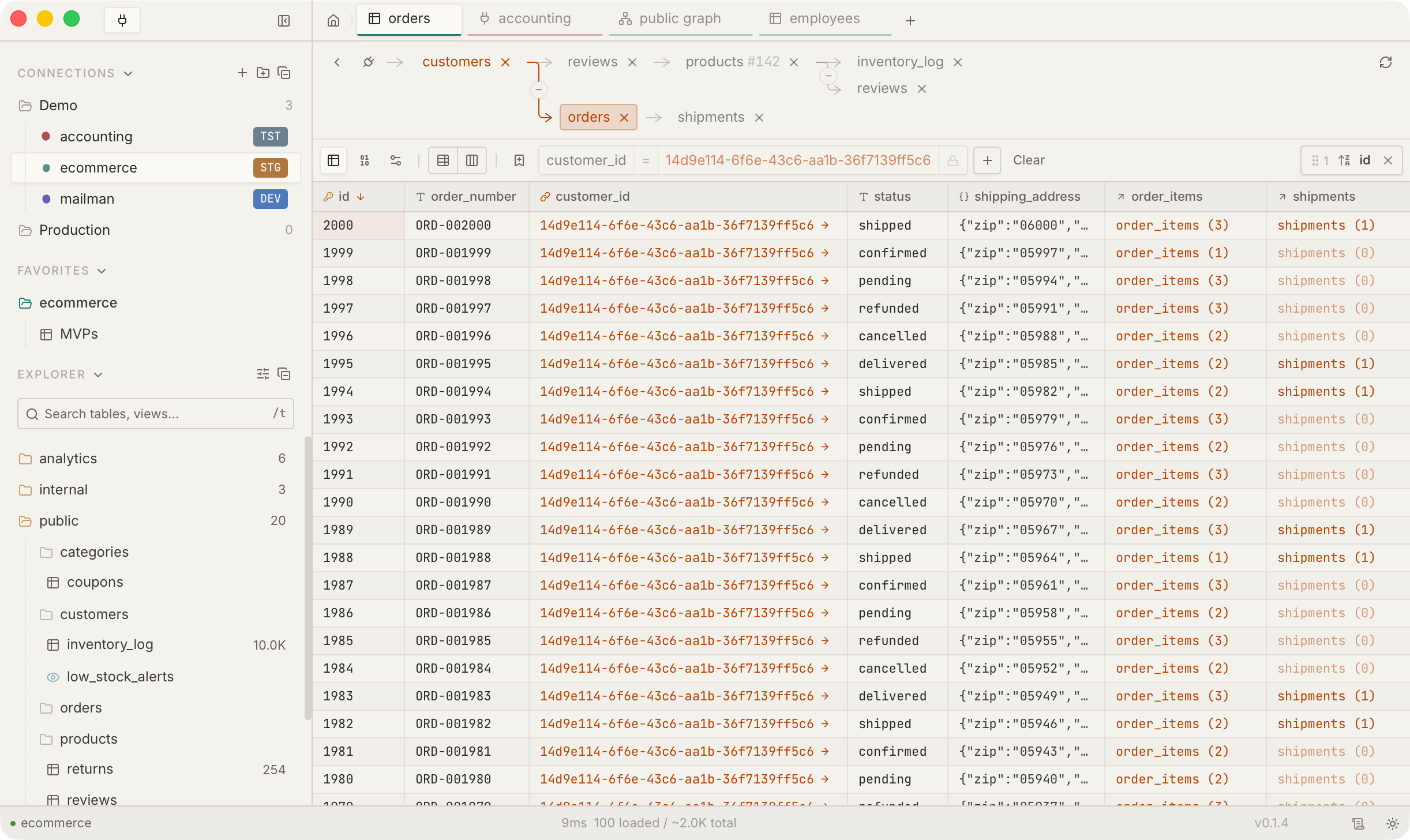
Click through your data
A graph navigation model so good it will convert keyboard diehards. FKs, reverse FKs, join tables, all navigable.
Learn more ›Connects to where you work
Docker containers, Neon branches, SSH-tunneled prod, SQLite files. Spin one up, /table picks it up. Tear it down, it’s gone.
Learn more ›Screenshot-worthy schema diagrams
Create bespoke ER diagrams of important tables, hide the rest. Pin nodes, hide annoying tables, highlight edges. Get the perfect shot for your RFC.
Learn more ›Connect and work where you already are
Parallel development is the new normal.
A normal day is 7 worktrees, 2 compose stacks, and a bastion host.
Docker auto-detect
Detects running Postgres and MySQL containers, reads creds from their env, and groups them by docker-compose project. Spin a stack up, your DB is in the sidebar. Tear it down, it’s gone.
Neon branch sync
Paste a Neon API key. Every project and branch shows up automatically. Create a branch from a PR, it appears; delete it, it disappears.
Multi-database, one connection
Hit ⌘D to flip between every database on the server. Each one keeps its own tabs, so context switching doesn’t blow away your work.
First-class SSH tunneling
Production behind a bastion is a normal connection, not a hack with a separate terminal window.
From the terminal you’re in
slashtable postgres://user:pw@host/db opens the app on that connection. Drop it in package.json scripts or .envrc — your terminal muscle memory works.
Credentials where they already live
macOS Keychain, 1Password, Bitwarden, AWS Secrets Manager, HashiCorp Vault. Stop pasting passwords into text fields.
Navigate schema and data
Bidirectional FK navigation.
Click a foreign key value to drill into the related records. A novel breadcrumb tree tracks your full path and every level is clickable.
Reverse FK lookups show every record that points to the current one. Pure join tables collapse into direct relationships so navigation stays clean.
Stack your own filters on top and keep drilling. Traverse the tree from the keyboard with ⌘← ⌘→ ⌘↑ ⌘↓ — no mouse required.
Beautiful ER diagrams without noise.
Auto-layout your schema. Pin root tables to focus on, control graph depth to avoid clutter, search by name. What’s left matches your mental model.
Extend with plugins and agents
import { Plugin } from "slashtable";

export default class StatusBadge extends Plugin {
  onload() {
    this.registerCellRenderer({
      id: "order-status-badge",
      render(value, el) {
        const colors = {
          confirmed: "#44ff88",
          pending:   "#ffcc00",
          shipped:   "#00d4ff",
          cancelled: "#ff5555",
        };
        el.style.color = colors[value] ?? "#6b6860";
        el.textContent = value;
      },
    });
  }
}Bring Your Own Code.
Cell renderers, record enrichers, custom views, query hooks, toolbar actions, and themes. Write TypeScript, drop it in ~/.slashtable/plugins/.
Cell renderers change how columns look
Record enrichers attach external data to rows
Custom views add new tab types
Query hooks intercept SQL
Toolbar actions wire into the active connection
Controlled access for AI agents.
Two clicks of setup for Claude Desktop, Claude Code, Cursor, or Windsurf. Per-connection policy: hidden, read, or write. Every call is logged.
Try your best to modify the database, I promise it's safe.
Let me try every flavor of destructive query.
> DROP TABLE orders
✗ Blocked — DROP is not allowed
> DELETE FROM orders WHERE id = 1
✗ Blocked — DELETE is not allowed
> INSERT INTO orders (id) VALUES (0)
✗ Blocked — INSERT is not allowed
> TRUNCATE orders
✗ Blocked — TRUNCATE is not allowed
Keyword filter caught those. Let me try the sneaky stuff — CTEs that write:
> WITH d AS (DELETE FROM orders RETURNING *) SELECT * FROM d
✗ Blocked — cannot execute DELETE in a read-only transaction
It’s holding up. Two independent layers: a statement-level keyword filter, and a database-level read-only transaction underneath. The CTE bypassed the filter but Postgres itself refused.
More of the client
Everything else.
SQL editor
Autocomplete that knows your schema, tables, and columns. Multi-statement execution with per-statement timing. Auto-format for the queries you’re not proud of. Run active query (⌃⏎), all (⇧⏎), or selection (⌘⏎).
Filter from the keyboard
Press f in any table to start typing. One command input instead of a builder. NOT toggle is its own switch. Fuzzy match across columns and the command palette too.
Saved favorites
Pin a configured filter set to a table. Drag to reorder, drop into folders. The filters you reach for, where you reach for them.
Array & JSON cell editors
First-class editors for text[], int[], uuid[], and json/jsonb cells. No more composing literal SQL by hand.
Safe data mutations
Edit rows inline. Changes queue with a SQL diff preview before anything commits. Revert one edit, or nuke them all.
Schema-aware grid
Composite primary keys, Postgres user-defined types (enums, domains, citext), and inet/cidr render and edit correctly. Fewer 'your schema isn’t supported' walls.
Virtual scrolling
Renders only what’s on screen. Scroll through millions of rows and 200-column tables without pagination, memory spikes, or a LIMIT clause you’ll forget to remove.
Schema graph, scoped
Open a graph from any table’s context menu and start there, not in a 500-node soup. Adjust depth, pin starting tables, hide the noise.
Prefix grouping
Snake- or camel-case tokenizer rolls user_*, billing_*, and friends into collapsible groups in the Explorer. Real schemas with hundreds of tables stop being a scroll-fatigue exercise.
Customizable keybindings
Every global action is rebindable, with multiple bindings per action. Make the app fit your hands.
Connection paint
Color-and-icon tags on connections. Trivial to set up, surprisingly load-bearing once you have prod, staging, and dev side by side.
Connection organization
Folders, color tags, and environment badges. Tell databases apart at a glance. Run a query against the wrong one less often.
Tab workspaces per connection
Explorer, SQL, and Schema Graph tabs with independent state, preserved per connection and per database. Switching context doesn’t blow away your open tables.
Command palette
⌘K opens it. New connection, disconnect, reconnect (⇧R), release notes — all from the keyboard. Keyword aliases too.
Semantic column types
Detects emails, URLs, images, currency, and dates. Renders them as clickable links, formatted values, and relative timestamps. Per-column override.
SQL execution logging
Every query logged with timing, row count, and parameters. When something goes wrong at 2am, you’ll know exactly which query did it.
Regret-driven development
Every destructive action shows a SQL preview and a confirmation dialog. The UI actively discourages you from doing anything you’d have to explain in a postmortem.
And more...
Download the app and find out what didn’t fit in this list. Shipping daily.
Get the app
/table.app
Built with Rust and React.
macOS downloads
Linux downloads (alpha)


Or if you’re, like, really into buttons
Download for Mac (Silicon)🍺 Also available via Homebrew
Community
Build with us
Come watch, or come help. Let me know what you think.